Getting started
Installation
The plugin requires Node.js 20.9 or newer. You can install this library using your favorite package manager:
# npm
npm install --save-dev @pixsame/cypress-plugin-visual-regression-diff

# yarn
yarn add -D @pixsame/cypress-plugin-visual-regression-diff

# pnpm
pnpm add -D @pixsame/cypress-plugin-visual-regression-diff
Next, you need to import the library:
- first, in your support file (located by default in
cypress/support/index.js):
// typescript / ES6
import '@pixsame/cypress-plugin-visual-regression-diff';

// javascript
require('@pixsame/cypress-plugin-visual-regression-diff');
- secondly, in
cypress.config.js(orcypress.config.ts):
// typescript / ES6
import { defineConfig } from 'cypress';
import { initPlugin as initVisualRegressionPlugin } from '@pixsame/cypress-plugin-visual-regression-diff/plugins';

export default defineConfig({
  // initPlugin must be called in the section where it is used: e2e or component
  e2e: {
    setupNodeEvents(on, config) {
      initVisualRegressionPlugin(on, config);
    },
  },
  component: {
    setupNodeEvents(on, config) {
      initVisualRegressionPlugin(on, config);
    },
  },
});
That's it - now let's see how to use the library in usage section.
Usage
Once installed, the library might be used by writing in your test:
cy.get('.an-element-of-your-choice').matchImage();
Or, if you would like to make a screenshot of whole document:
cy.matchImage();
matchImage command will do a screenshot and compare it with image from a previous run. In case of regression the test will fail and you'll get a "See comparison" button to see what's a root of a problem.
Example
Still got troubles with installation? Have a look at examples directory of this repo to see how this plugin can be used in e2e or component-testing Cypress environment within your project.
Automatic clean up of unused images
It's useful to remove screenshots generated by the visual regression plugin that are not used by any test anymore. Enable this feature via expose variable and enjoy freed up storage space 🚀:
# Cypress 15.10+
npx cypress run --expose "pluginVisualRegressionCleanupUnusedImages=true"
# Cypress <15.10 (deprecated in 15.10, removed in 16)
npx cypress run --env "pluginVisualRegressionCleanupUnusedImages=true"
Run manifest (CI integration)
From 1.1 on, every run writes a JSON manifest listing each matchImage comparison: which test it came from, whether it passed, failed, created or updated its baseline, the diff ratio, and the project-relative paths of the baseline, .actual.png and .diff.png files. Next to the entries it records where the run happened (CI provider, repository, commit, pull request, run id) and what it ran with (browser, specs, config file, plugin options), so a tool reading the file can report on the right PR, download the right artifact, or re-run the same comparisons. It is meant for CI tooling (PR comments, review dashboards, approval bots) that runs after Cypress is done.
The format is an open, runner-agnostic standard built upon CTRF and documented at visual-regression.dev/manifest. The npm package visual-regression-manifest ships the JSON Schema, the TypeScript types, a validating reader, a merger for the manifests of a whole run and converters for tools that write no manifest of their own (Playwright's toHaveScreenshot, Vitest, jest-image-snapshot, BackstopJS, CTRF reports, plain image files). Build your tooling on that package rather than on this plugin.
By default the file lands next to your other Cypress artifacts, at <screenshotsFolder>/visual-regression-manifest.<testingType>.json (e.g. cypress/screenshots/visual-regression-manifest.e2e.json). Upload it together with your snapshots directory as a CI artifact.
{
  "reportFormat": "visual-regression-manifest",
  "specVersion": "1.0.0-beta.1",
  "createdAt": "2026-09-22T10:00:00.000Z",
  "updatedAt": "2026-09-22T10:03:12.481Z",
  "projectRoot": "/home/runner/work/app/app",
  "platform": {
    "osPlatform": "linux",
    "arch": "x64",
    "osRelease": "6.8.0-1021-azure",
  },
  "ci": {
    "provider": "github",
    "repositoryName": "acme/app",
    "repositoryUrl": "https://github.com/acme/app",
    "commit": "0f1e2d…", // on pull_request events: the merge commit
    "ref": "refs/pull/42/merge",
    "branchName": "feat/new-header",
    "pullRequest": {
      "number": 42,
      "headSha": "9a8b7c…",
      "headRef": "feat/new-header",
      "baseRef": "main",
    },
    "event": "pull_request",
    "buildId": "1234567890",
    "buildName": "CI",
    "buildUrl": "https://github.com/acme/app/actions/runs/1234567890/attempts/1",
    "runAttempt": "1",
    "job": "e2e",
    "workspace": "/home/runner/work/app/app",
  },
  "tool": {
    "name": "@pixsame/cypress-plugin-visual-regression-diff",
    "version": "1.1.0",
  }, // what wrote the file
  "options": { "updateImages": "failures-only" }, // global pluginVisualRegression* options, prefix stripped
  "runner": {
    "name": "cypress",
    "version": "16.1.0",
    "testingType": "e2e",
    "mode": "run",
    "configFile": "cypress.config.ts",
    "browser": {
      "name": "chrome",
      "version": "130.0.0.0",
      "family": "chromium",
      "headless": true,
    },
    "specs": ["cypress/e2e/home.cy.ts"],
    "specPattern": "cypress/e2e/**/*.cy.{js,jsx,ts,tsx}",
    "baseUrl": "http://localhost:3000",
    "viewport": { "width": 1280, "height": 720 },
  },
  "summary": {
    "entries": 1,
    "passed": 0,
    "failed": 1,
    "missingBaseline": 0,
    "created": 0,
    "updated": 0,
    "approved": 0,
    "needsHuman": 1,
  },
  "entries": [
    {
      "name": "home page renders_#0",
      "test": {
        "filePath": "cypress/e2e/home.cy.ts",
        "titlePath": ["home page", "renders"],
        "retry": 0,
      },
      "status": "failed",
      "comparison": { "diffRatio": 0.0231, "threshold": 0.01 },
      "images": {
        "baseline": {
          "path": "cypress/e2e/__image_snapshots__/home page renders_#0.png",
          "width": 1280,
          "height": 720,
        },
        "actual": {
          "path": "cypress/e2e/__image_snapshots__/home page renders_#0.actual.png",
          "width": 1280,
          "height": 720,
        },
        "diff": {
          "path": "cypress/e2e/__image_snapshots__/home page renders_#0.diff.png",
        },
      },
      "baselineWritten": false,
      "recordedAt": "2026-09-22T10:03:12.480Z",
      "platform": {
        "osPlatform": "linux",
        "arch": "x64",
        "browser": {
          "name": "chrome",
          "version": "130.0.0.0",
          "family": "chromium",
          "headless": true,
        },
      },
      "viewport": { "width": 1280, "height": 720 },
      "options": {
        "imagesPath": "{spec_path}/__image_snapshots__",
        "maxDiffThreshold": 0.01,
        "diffConfig": {},
        "createMissingImages": true,
        "updateImages": false,
        "forceDeviceScaleFactor": true,
        "screenshotConfig": {},
      },
      "renderer": {
        "backend": "native",
        "browser": "chrome",
        "browserVersion": "130.0.0.0",
      },
      "hashes": {
        "baseline": "3b7e…", // sha256 of the files listed in `images`, only for files that exist
        "actual": "9d21…",
        "diff": "c0ff…",
      },
      "message": "2310 pixels (2.31%) differ; the limit is 1%.",
    },
  ],
}
status | meaning | images.actual.path | images.diff.path |
|---|---|---|---|
passed | within threshold | null | null |
failed | above threshold, .actual.png and .diff.png kept for review | path | path |
missing-baseline | no baseline and createMissingImages: false | path | null |
created | no baseline, .actual.png became the baseline | null | null |
updated | baseline overwritten (updateImages: true or 'failures-only') | null | null |
approved | baseline replaced from the headed review UI ("Replace image") | null | null |
Run-level fields:
| field | meaning |
|---|---|
createdAt, updatedAt | when the run started and when the file was last rewritten (ISO 8601) |
platform | osPlatform (linux, darwin, win32), arch, the kernel osRelease and, in run mode, the human-readable osVersion of the machine that ran the tests |
tool | what wrote the file: this plugin and its version |
ci | detected from environment variables on GitHub Actions and GitLab CI; { "provider": null } on other CI systems (only CI is set), null when not on CI. Only the listed keys are ever copied from the environment |
options | every pluginVisualRegression* option from expose/env, prefix stripped, values as configured (CLI values stay strings) |
runner | what ran the tests. mode is run or open; browser is the launched browser; specs is only known in run mode; configFile and specs are relative to projectRoot. Cypress Cloud runs also get cloud.runUrl, group, tag, parallel |
summary | counts of the entries per status; needsHuman is failed + missingBaseline, so a consumer can decide without reading the entries |
Notes for consumers:
- All paths are relative to
projectRootand use/separators; they may point outside the project (../…) whenimagesPathis absolute.projectRootis the Cypress project, not necessarily the repository root:ci.workspaceis the checkout directory, sorelative(ci.workspace, projectRoot)gives the path prefix inside the repository. failedandmissing-baselineare the entries that need a human: copyingimages.actual.pathoverimages.baseline.pathapproves them.baselineWrittentells whether the working tree changed for that screenshot, regardless ofstatus.- An entry whose comparison found differences carries
extra.pixsame.analysis(unlessanalysisis off): alabel(content-change,moved,noise-likeorsize-change), a one-sentencedescription, the changedregionswith their boxes, a detectedshift, and abundleKeythat is equal for entries that changed in the same way.bundle()from@pixsame/analysisgroups entries by it. - Every entry carries its own
platformandviewport, so entries from a matrix of machines can be told apart after concatenating several manifests.optionson an entry is the exactmatchImageinput (imagesPathkeeps its tokens unexpanded);comparisonis the result. platformis where the test ran,rendereris where the pixels came from. Today every screenshot is taken by the browser Cypress drives, sorenderer.backendisnativeandrenderer.browserrepeatsplatform.browser.name. The field exists so that a renderer other than the local browser (a pinned Docker image, a hosted renderer) can identify itself withrendererVersionandimageDigest, and so that a run that had to fall back to the local browser can be flagged withrenderer.fallback: true. Treat entries with different renderers as different baselines.hashesholds the sha256 of each file inimagesthat exists on disk. Use it to skip re-uploading unchanged baselines, to check that an artifact matches the manifest, or to spot two entries that produced identical pixels.- Mapping to a pull request: use
ci.repositoryNameandci.pullRequest.number. On GitHubpull_requesteventsci.commitis the temporary merge commit, so anything that pushes to the PR branch must useci.pullRequest.headSha/headRef. The workflow artifact is found viaci.buildIdandci.runAttempt. - Reproducing a run:
npx cypress run --<runner.testingType> --browser <runner.browser.name> --config-file <runner.configFile> --spec <runner.specs joined with ,>, plus one--expose "pluginVisualRegression<Key>=<value>"per entry ofoptions. The manifest stores these as parts rather than a command string, so shell quoting and the package manager stay your choice. - The file is rewritten after every comparison, so it is complete even when the run is aborted. When specs run in parallel on several machines, each machine writes its own manifest;
**/visual-regression-manifest{,.*}.json(MANIFEST_FILE_GLOBin the package) finds all of them in an artifact, andreadManifestFiles+mergeManifestsfromvisual-regression-manifestturn them into one list with a later CI attempt winning over an earlier one. - Only the
runnerblock and the keys ofoptionsare Cypress-specific; the rest of the format is shared with every other writer.specVersionfollows semver and its major is bumped on breaking changes to the format only; consumers ignore keys they do not know. Because the field names follow CTRF,toCtrffrom the package turns a manifest into a CTRF report for tooling that reads that format. - The
Manifest*types are re-exported from@pixsame/cypress-plugin-visual-regression-diff/pluginsfor convenience; they are the ones fromvisual-regression-manifest.
The manifest is on by default. To write it somewhere else (paths are resolved against the project root) or to turn it off, use the pluginVisualRegressionManifestPath key (false disables it, nothing else changes):
# Cypress 15.10+
npx cypress run --expose "pluginVisualRegressionManifestPath=reports/visual-regression.json"
npx cypress run --expose "pluginVisualRegressionManifestPath=false"
# Cypress <15.10 (deprecated in 15.10, removed in 16)
npx cypress run --env "pluginVisualRegressionManifestPath=false"
When you run both e2e and component tests with a custom path, include the testing type in it yourself; the runs would otherwise overwrite each other's file.
Configuration
Configure the plugin:
- by passing in configuration as an argument to
matchImagecommand:
cy.matchImage({
  // screenshot configuration, passed directly to the the Cypress screenshot method: https://docs.cypress.io/api/cypress-api/screenshot-api#Arguments
  // default: { }
  screenshotConfig: {
    blackout: ['.element-to-be-blackouted'],
  },
  // pixelmatch options, see: https://www.npmjs.com/package/pixelmatch#pixelmatchimg1-img2-output-width-height-options
  // default: {} - pixelmatch defaults, notably includeAA: false (anti-aliased edge pixels are not counted as differences)
  diffConfig: {
    threshold: 0.01,
  },
  // whether to create missing baseline images automatically
  // default: true
  createMissingImages: false,
  // whether to update images automatically - useful for CI
  // - true: overwrite all baseline images without comparing (fastest)
  // - 'failures-only': compare first, update baseline only when diff exceeds threshold
  // - false: never update baseline images automatically
  // default: false
  updateImages: true,
  // directory path in which screenshot images will be stored
  // relative path are resolved against project root
  // absolute paths (both on unix and windows OS) supported
  // path separators will be normalised by the plugin depending on OS, you should always use / as path separator, e.g.: C:/my-directory/nested for windows-like drive notation
  // These variables can be used in the path:
  // - {spec_path} - relative path leading from project root to the current spec file directory (e.g. `/src/components/my-tested-component`); has to be a whole path segment
  // - {platform} - `{os}-{browser}`, e.g. `linux-chrome`, `darwin-electron`, `win32-firefox`
  // - {os} - Cypress.platform: `linux`, `darwin` or `win32`
  // - {browser} - the browser Cypress runs the spec in (Cypress.browser.name): `electron` unless `--browser` says otherwise, `chrome`, `firefox`, `edge`, ...
  // {platform}, {os} and {browser} can also be part of a segment (`shots-{platform}`); `matchAgainstPath` is never expanded
  // Use them to keep baselines of different OSes/browsers apart, see "Per-platform baselines" below
  // default: '{spec_path}/__image_snapshots__'
  imagesPath: 'this-might-be-your-custom/maybe-nested-directory',
  // maximum threshold above which the test should fail
  // default: 0.01
  maxDiffThreshold: 0.1,
  // describe what changed when a comparison finds differences, e.g. "Everything below y=340 moved down by 12 px."
  // the sentence ends the failure message, shows in the review carousel and is recorded in the run manifest
  // it never changes whether the comparison passes
  // default: true
  analysis: false,
  // forces scale factor to be set as value "1"
  // helps with screenshots being scaled 2x on high-density screens like Mac Retina
  // default: true
  forceDeviceScaleFactor: false,
  // applies the deterministic rendering preset, see "Reducing cross-OS rendering noise" below
  // per call it only controls the CSS injected into the page for the screenshot (caret, animations, scrollbars);
  // the browser switches are process-wide and follow the global pluginVisualRegressionDeterministicRendering option
  // default: true
  deterministicRendering: false,
  // title used for naming the image file
  // default: Cypress.currentTest.titlePath (your test title)
  title: `${Cypress.currentTest.titlePath.join(' ')} (${Cypress.browser.displayName})`,
  // pass a path to custom image that should be used for comparison
  // instead of checking against the image from previous run
  // default: undefined
  matchAgainstPath: '/path/to/reference-image.png',
});
- via global expose configuration (Cypress 15.10+). Configuration key names are the same as the keys of the configuration object above, but with added
pluginVisualRegressionprefix, e.g.:
# Cypress 15.10+
npx cypress run --expose "pluginVisualRegressionUpdateImages=true,pluginVisualRegressionDiffConfig={\"threshold\":0.01}"
# Cypress <15.10 (deprecated in 15.10, removed in 16)
npx cypress run --env "pluginVisualRegressionUpdateImages=true,pluginVisualRegressionDiffConfig={\"threshold\":0.01}"
Pass several options in one flag, separated by commas. When --expose (or --env) is repeated, Cypress keeps only the last occurrence.
// cypress.config.ts (Cypress 15.10+)
import { defineConfig } from 'cypress';

export default defineConfig({
  expose: {
    pluginVisualRegressionUpdateImages: true,
    pluginVisualRegressionDiffConfig: { threshold: 0.01 },
  },
});
// cypress.config.ts (Cypress <15.10, deprecated in newer versions)
import { defineConfig } from 'cypress';

export default defineConfig({
  env: {
    pluginVisualRegressionUpdateImages: true,
    pluginVisualRegressionDiffConfig: { threshold: 0.01 },
  },
});
For more ways of setting expose variables take a look here.
Per-platform baselines
Chrome hands text rasterization to the operating system, so the same page never renders byte-for-byte identically on macOS, Linux and Windows, and browsers differ from each other on top of that. A baseline recorded on a developer's Mac therefore rarely matches the screenshot a Linux CI job takes of the same page. imagesPath understands three tokens that keep the baselines of different platforms apart instead of letting them overwrite each other:
| token | expands to |
|---|---|
{os} | Cypress.platform: linux, darwin or win32 |
{browser} | Cypress.browser.name, the browser Cypress runs the spec in: electron unless you pass --browser, else chrome, firefox, edge, ... |
{platform} | {os}-{browser}, e.g. linux-chrome, darwin-electron |
Every screenshot is taken by the browser Cypress drives, so {browser} is that browser; cypress run without --browser uses Electron, which is why the folder is darwin-electron and not darwin-chrome unless CI passes --browser chrome.
They are opt-in: the default imagesPath stays {spec_path}/__image_snapshots__, a single set of baselines for everyone. That is the right layout when every run happens on the same OS and browser (for instance inside a container, see the FAQ) or when the remaining drift stays under your maxDiffThreshold. To split by platform, add the token globally:
# Cypress 15.10+
npx cypress run --expose "pluginVisualRegressionImagesPath={spec_path}/__image_snapshots__/{platform}"
# Cypress <15.10 (deprecated in 15.10, removed in 16)
npx cypress run --env "pluginVisualRegressionImagesPath={spec_path}/__image_snapshots__/{platform}"
// cypress.config.ts (Cypress 15.10+; use `env` instead of `expose` on Cypress <15.10)
export default defineConfig({
  expose: {
    pluginVisualRegressionImagesPath:
      '{spec_path}/__image_snapshots__/{platform}',
  },
});
cypress/e2e/__image_snapshots__/
├── darwin-electron/   # what `cypress open` writes on a Mac
│   └── home page renders_#0.png
└── linux-chrome/      # what your CI job writes
    └── home page renders_#0.png
Things to decide once you split:
- Which baselines to commit. Most teams commit only the CI platform and keep local ones out of git, so every developer gets their own set without polluting the repository:
# ignore every platform folder except the one CI produces
**/__image_snapshots__/*/
!**/__image_snapshots__/linux-chrome/
New CI baselines then need to be produced on CI and committed from there (or approved from a PR, see Run manifest). - Splitting only by browser or only by OS. Use
{browser}or{os}on their own, e.g.{spec_path}/__image_snapshots__/{browser}. - Cleanup deletes the other platforms' baselines.
pluginVisualRegressionCleanupUnusedImagesglobs the whole project for plugin-made PNGs and knows nothing about platforms: a run ondarwin-electrontreats every file underlinux-chrome/as unused and deletes it. Keep it off on machines that hold more than one platform's folder (a developer's checkout with committed CI baselines is exactly that) and enable it only where a single platform's baselines live, typically the CI job that produces them. If it does bite, the deleted folders come back withgit checkout -- <folder>.
Where this is heading: the plan for #212 is a renderer that produces the pixels in a pinned Docker image no matter where Cypress runs, so local and CI images stop drifting by construction. {browser} then names the renderer's browser rather than the one Cypress drives, and {platform} remains useful for keeping several rendered browsers apart rather than for local-vs-CI drift. The manifest already records both sides: platform is where the test ran, renderer is where the pixels came from.
Batch Review Mode
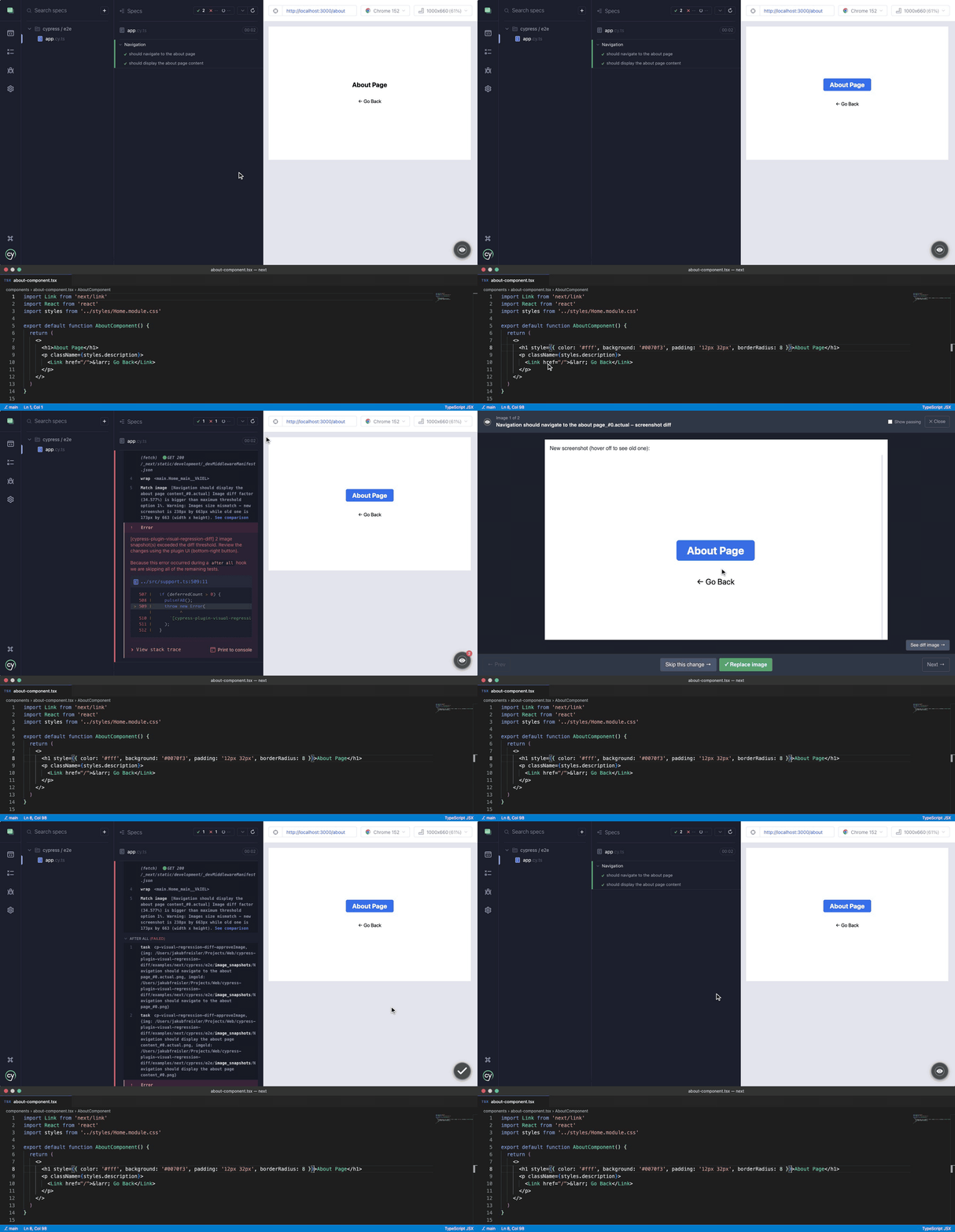
Batch Review Mode is enabled by default. It lets you run a full test suite without stopping on the first visual diff failure. Instead, all failing snapshots are collected and presented in an interactive review UI after the tests complete, so you can approve or skip changes in bulk.
Additions in headed mode (non-CI environments)
A floating action button (FAB) appears in the bottom-right corner of the Cypress test runner. As tests run:
- Whenever a
matchImage()call exceeds the diff threshold, the counter badge on the FAB increments instead of immediately throwing an error. - Once all tests finish, an error is thrown with the total count of failures.
- Clicking the FAB opens a carousel where you can review each failing snapshot side-by-side (new vs. old) and either replace the baseline or skip the change.
Note: Before version 2 of
@pixsame/cypress-plugin-visual-regression-diffBatch Review Mode was opt-in. See the migration guide if you upgrade from 4.x.
How to disable
Batch Review Mode is a global option (it cannot be passed to matchImage directly). To go back to failing matchImage() immediately on the first mismatch, set the pluginVisualRegressionBatchReviewMode key to false:
# Cypress 15.10+
npx cypress open --expose "pluginVisualRegressionBatchReviewMode=false"
# Cypress <15.10 (deprecated in 15.10, removed in 16)
npx cypress open --env "pluginVisualRegressionBatchReviewMode=false"
// cypress.config.ts (Cypress 15.10+)
import { defineConfig } from 'cypress';

export default defineConfig({
  expose: {
    pluginVisualRegressionBatchReviewMode: false,
  },
});
// cypress.config.ts (Cypress <15.10, deprecated in newer versions)
import { defineConfig } from 'cypress';

export default defineConfig({
  env: {
    pluginVisualRegressionBatchReviewMode: false,
  },
});
Reviewing passing images
Images that differ from the baseline but stay within maxDiffThreshold do not fail the test, yet they are still collected. The carousel has a Show passing checkbox that lets you browse them (each is marked with a passed badge) and replace their baseline too, e.g. to get rid of small accumulated drift.
The checkbox is unchecked by default. Use the pluginVisualRegressionBatchReviewModeShowPassingImages key to make it checked by default:
# Cypress 15.10+
npx cypress open --expose "pluginVisualRegressionBatchReviewModeShowPassingImages=true"
# Cypress <15.10 (deprecated in 15.10, removed in 16)
npx cypress open --env "pluginVisualRegressionBatchReviewModeShowPassingImages=true"
// cypress.config.ts (Cypress 15.10+)
import { defineConfig } from 'cypress';

export default defineConfig({
  expose: {
    pluginVisualRegressionBatchReviewModeShowPassingImages: true,
  },
});
Toggling the checkbox in the runner is remembered in the browser's local storage and takes precedence over the configured value on subsequent runs.
Reducing cross-OS rendering noise
Browsers hand text rasterisation to the operating system (CoreText on macOS, DirectWrite on Windows, FreeType on Linux), so the same page never renders byte-for-byte identical on a developer's laptop and a Linux CI runner. The plugin cannot make that go away entirely, but the deterministicRendering preset (enabled by default) removes the part of the noise that lives inside the browser:
- Chrome, Chromium, Edge are launched with
--font-render-hinting=none --disable-font-subpixel-positioning --disable-lcd-text --force-color-profile=srgb --disable-gpu(text without OS hinting and subpixel tricks, no colour management, CPU rasterisation), plus--hide-scrollbarsin headless mode. The list is exported asDETERMINISTIC_RENDERING_CHROMIUM_ARGSfrom@pixsame/cypress-plugin-visual-regression-diff/constants. - Firefox gets the
gfx.webrender.softwarepreference (CPU rendering). Firefox has no cross-platform switch for font hinting, so text may still differ between operating systems. - Every browser: for the duration of a
matchImagescreenshot a<style>element is injected into the tested page that hides the text caret, disables CSS transitions, animations and smooth scrolling, and hides scrollbars. It is removed right after the screenshot. - The comparison runs
pixelmatchwithincludeAA: false, so anti-aliased edge pixels are detected and not counted as differences.
What the preset does not solve: different font files and fallbacks per OS (the classic Arial vs. Liberation Sans case), emoji fonts, WebKit and Firefox text rasterisation, and images drawn by WebGL. For those, keep one baseline per platform (see the title and imagesPath options and the FAQ entry about browser names) or generate your baselines in the same environment your CI uses.
Electron ignores switches set by plugins. Pass them through the environment instead:
ELECTRON_EXTRA_LAUNCH_ARGS="--font-render-hinting=none --disable-font-subpixel-positioning --disable-lcd-text --force-color-profile=srgb --disable-gpu --hide-scrollbars" npx cypress run
WebGL: --disable-gpu may leave pages that depend on WebGL without a rendering context. Either disable the preset or add --use-gl=angle --use-angle=swiftshader (recent Chrome also wants --enable-unsafe-swiftshader) in your own before:browser:launch handler, composed with the plugin's one via cypress-on-fix.
Screenshot hooks: the plugin passes its own onBeforeScreenshot and onAfterScreenshot to every screenshot it takes. Hooks given via screenshotConfig are still called; hooks set globally with Cypress.Screenshot.defaults() are not.
To turn the preset off globally (browser switches and CSS):
# Cypress 15.10+
npx cypress run --expose "pluginVisualRegressionDeterministicRendering=false"
# Cypress <15.10 (deprecated in 15.10, removed in 16)
npx cypress run --env "pluginVisualRegressionDeterministicRendering=false"
// cypress.config.ts (Cypress 15.10+)
import { defineConfig } from 'cypress';

export default defineConfig({
  expose: {
    pluginVisualRegressionDeterministicRendering: false,
  },
});
To keep the browser switches but skip the CSS for a single screenshot (e.g. when an animation's end state is what you want to capture):
cy.matchImage({ deterministicRendering: false });
FAQ
Why screenshots doesn't conform to the viewport set in my Cypress configuration?
Screenshots in Cypress do not scale to the viewport size by default. You can change this behavior:
- globally, by changing default screenshot configuration:
Cypress.Screenshot.defaults({ capture: 'viewport' }); - locally, by passing screenshot configuration directly to the
.matchImagecommand:cy.matchImage({ screenshotConfig: { capture: 'viewport' } });
I've upgraded version of this plugin and all on my baseline images has been automatically updated. Why?
Sometimes we need to do a breaking change in image comparison or image generation algorithms. To provide you with the easiest upgrade path - the plugin updates your baseline images automatically. Just commit them to your repository after the plugin upgrade and you are good to go!
Screenshots look different between cypress run and cypress open. How do I fix it?
This is typically caused by device pixel ratio differences between headless and headed modes. Use the forceDeviceScaleFactor option to normalize the scale factor to 1:
cy.matchImage({ forceDeviceScaleFactor: true });
Or set it globally via expose variable:
# Cypress 15.10+
npx cypress run --expose "pluginVisualRegressionForceDeviceScaleFactor=true"
# Cypress <15.10 (deprecated in 15.10, removed in 16)
npx cypress run --env "pluginVisualRegressionForceDeviceScaleFactor=true"
For persistent viewport size differences, consider setting the browser window size explicitly in setupNodeEvents (compose it with the plugin's own before:browser:launch handler via cypress-on-fix):
on('before:browser:launch', (browser, launchOptions) => {
  if (browser.family === 'chromium' && browser.isHeadless) {
    launchOptions.args.push('--window-size=1280,720');
  }
  return launchOptions;
});
If the two runs happen on different operating systems (a macOS laptop vs. a Linux CI runner), the remaining differences come from font rendering. See Reducing cross-OS rendering noise.
How do I use this plugin alongside other Cypress plugins that also register setupNodeEvents events?
Cypress only supports a single handler per event. If multiple plugins register the same event (e.g. after:screenshot), only the last one will be called. To compose multiple plugins safely, use cypress-on-fix:
import { defineConfig } from 'cypress';
import { initPlugin as initVisualRegressionPlugin } from '@pixsame/cypress-plugin-visual-regression-diff/plugins';
import fix from 'cypress-on-fix';

export default defineConfig({
  e2e: {
    setupNodeEvents(on, config) {
      const fixedOn = fix(on);
      initVisualRegressionPlugin(fixedOn, config);
      // register other plugins using fixedOn here
    },
  },
});
How do I integrate with mochawesome or other reporters that embed screenshot images?
The plugin stores baseline images outside the default cypress/screenshots/ directory. Some reporters (like cypress-mochawesome-reporter) expect screenshots to be in that folder.
Use the processImgPath task hook to control where the screenshot file is placed. Override it in setupNodeEvents after calling initPlugin:
setupNodeEvents(on, config) {
  initVisualRegressionPlugin(on, config);

  // Override the path processor to keep screenshots accessible to the reporter
  on('task', {
    'cp-visual-regression-diff-processImgPath': ({ path }: { path: string }) => {
      // return a new path, or the same path to keep default behavior
      return path;
    },
  });
}
How to fail on any visual difference, no matter how small?
Set maxDiffThreshold to 0:
cy.matchImage({ maxDiffThreshold: 0 });
Or globally via an expose variable:
# Cypress 15.10+
npx cypress run --expose "pluginVisualRegressionMaxDiffThreshold=0"
# Cypress <15.10 (deprecated in 15.10, removed in 16)
npx cypress run --env "pluginVisualRegressionMaxDiffThreshold=0"
Why is the actual screenshot deleted after a successful image comparison?
When images match, the .actual.png file is temporary and gets cleaned up after the comparison. Only the baseline image (no suffix) is kept. This avoids storing redundant files.
When images do not match, the .actual.png file is kept and carries the same plugin metadata as a baseline image. You can safely rename or copy it over the baseline (e.g. in a CI job that opens a PR with updated baselines) - the plugin will treat it as an up-to-date baseline and won't rewrite it on the next run.
If you need actual screenshots to stay accessible for a reporter (e.g. cypress-mochawesome-reporter), use the processImgPath task hook to control where screenshots are stored. See How do I integrate with mochawesome or other reporters that embed screenshot images?
How to remove spaces from screenshot filenames?
Screenshot filenames are derived from Cypress test titles, which may contain spaces. To use a filename without spaces, pass a custom title option to each matchImage call:
cy.matchImage({ title: 'my-screenshot-without-spaces' });
To apply this globally for all matchImage calls, override the command in your support file (cypress/support/commands.ts):
Cypress.Commands.overwrite('matchImage', (originalFn, subject, options = {}) =>
  originalFn(subject, {
    title: Cypress.currentTest.titlePath.join(' ').replace(/\s+/g, '-'),
    ...options,
  }),
);
How to include the browser name in image filenames (for cross-browser testing)?
Use the {browser} token in imagesPath; it expands to the name of the browser that rendered the screenshot (chrome, firefox, electron, ...):
cy.matchImage({ imagesPath: '{spec_path}/__image_snapshots__/{browser}' });
Or globally:
# Cypress 15.10+
npx cypress run --expose "pluginVisualRegressionImagesPath={spec_path}/__image_snapshots__/{browser}"
# Cypress <15.10 (deprecated in 15.10, removed in 16)
npx cypress run --env "pluginVisualRegressionImagesPath={spec_path}/__image_snapshots__/{browser}"
This creates separate image directories per browser (__image_snapshots__/chrome/, __image_snapshots__/firefox/). See Per-platform baselines for {platform} and {os}, which also split by operating system, for which folders to commit, and for why pluginVisualRegressionCleanupUnusedImages must stay off on a machine that holds more than one browser's folder (it would delete the other browsers' baselines).
How to generate an HTML report showing baseline, diff, and actual images?
The plugin provides a built-in visual comparison overlay in the Cypress UI: clicking "See comparison" on a failed test shows the baseline, diff, and actual images side by side.
For CI or sharable HTML reports, integrate with a reporter such as cypress-mochawesome-reporter. See How do I integrate with mochawesome or other reporters that embed screenshot images? for setup details.